Authors: Aleksander Wennersteen, Thomas Badts
Slurm, the workload manager that runs many of the world’s supercomputers, can now treat a quantum processing unit (QPU) as a resource it schedules and manages per the expansion announced by NVIDIA. Slurm 26.11 adds a plugin interface for hierarchical resources (HRES), and together with IBM we have connected it to the Quantum Resource Management Interface (QRMI), so that Slurm manages access to Pasqal QPUs around each job.
Below, we look at what changes for HPC sites, how Slurm and QRMI work together, how we tested it with Pulser and NVIDIA CUDA-Q, and how a single Slurm workflow can take a program from GPU emulation to the QPU.
Quantum in the HPC workflow
In an HPC center, researchers do not log in to machines and run programs directly. They submit jobs to a workload manager such as Slurm, which decides when each job runs and allocates the resources it asks for: compute nodes, GPUs, memory, or software licenses. This is how centers share expensive machines fairly between many users, and how they account for their use.
Quantum computing fits into the same workflow. A quantum job also needs classical steps: preparing the experiment, testing it in emulation, running it on the QPU, and analyzing the results. The QPU is one more shared resource, and a scarce one. Our goal at Pasqal is that researchers can use our QPUs through the tools and practices their center already has, rather than through a separate system. In practice, researchers request the QPU in the batch scripts they already write, and administrators manage it from Slurm like any other resource. For a broader view of how quantum computing fits into HPC centers, see our earlier post, “Quantum enhances the HPC stack”.
A hybrid HPC-QC workflow
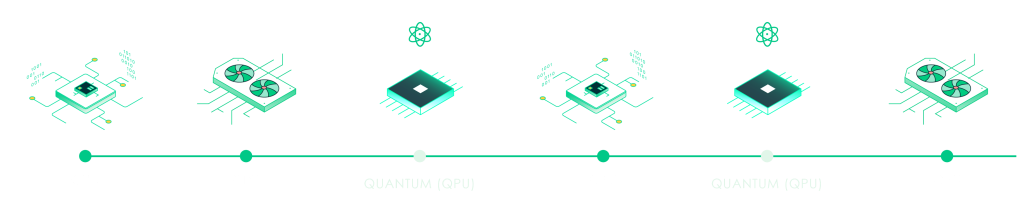
An application can use different processors at different stages.
Different resources
CPUs and GPUs handle classical work. QPUs execute selected quantum tasks.
An iterative workflow
Results from one stage become inputs to the next. Some stages repeat.
Cloud or on-premises
Quantum resources can be accessed remotely or within the HPC center.
Workload managers coordinate the work across the available resources
This already works in production. CINECA hosts Sol, a Pasqal QPU, integrated with its Slurm cluster through QRMI and Warden, the Pasqal service that manages access to an on-premises QPU. CINECA has run jobs on Sol this way, using the QRMI SPANK plugin, and plans to use CUDA-Q on the same path.
What HRES brings
Early HPC–QC integrations with Slurm often leveraged licenses, to track the resource consumption, and SPANK plugins in order to execute code and modify the execution environment of the hybrid job. This was needed as licenses do not execute code, and SPANK plugins give the QPU no native consumable representation in Slurm. The new HRES features enable us to move this logic into Slurm itself: its plugin interface lets an external service take part in the life of each job. For a site, that means:
- The scheduler knows whether the QPU is available. If it is down, for example for calibration or maintenance, jobs wait in the queue instead of starting and failing. This can be further customized using middleware like Pasqal’s open-source Warden.
- Access is set up before any user code runs, and removed afterwards. For an on-premises QPU, Slurm, through the HRES plugin, opens a session for each job and ends it when the job finishes, including when it is cancelled. Users never manage QPU sessions themselves.
- Sharing is a site policy. Administrators decide in one configuration file how many jobs may use each QPU at once, next to the rest of the cluster’s resources.
- One integration for several providers. The HRES–QRMI integration, developed by IBM and Pasqal, works through QRMI, so the same plugin serves IBM and Pasqal QPUs.
Moving from the SPANK plugin to HRES is a small step, and that is a result of building on QRMI from the start. Programs see the same environment under both, so Pulser and CUDA-Q code runs unchanged. Only the job request changes, from --qpu=PASQAL_LOCAL plus the site’s license to --resources=PASQAL_LOCAL:1, and the administrator adds a resource definition to Slurm.
The new HRES features require Slurm 26.11+. The QRMI SPANK plugin is the production route today: CINECA runs it, and it supports the same programs, so sites can start with it and move to HRES as it matures.
How it works
QRMI gives every quantum backend the same small interface: check a device’s status, acquire and release access, submit quantum tasks and fetch their results. The integration uses it on two paths that run in different places.
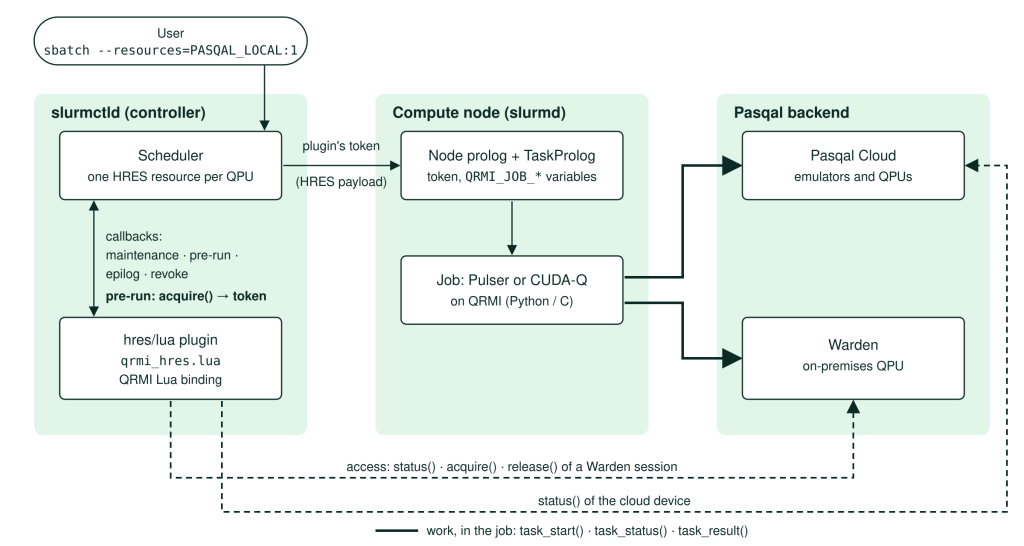
The controller checks availability and manages Warden sessions. The job sends the quantum program and retrieves its results.
Availability and sharing. Independently of any job, the HRES plugin checks each QPU’s status through QRMI at an interval the site sets, and Slurm disables the resource while the QPU is unavailable. For every QPU, cloud or on-premises, HRES also limits how many jobs use it at once.
Access, in the Slurm controller, for an on-premises QPU. At fixed points in each job’s life, Slurm calls the HRES plugin, which calls QRMI:
- When a job is scheduled and its nodes are allocated, the plugin acquires access, which opens a Warden session for the job’s user. The plugin, not Slurm, obtains the access token, and Slurm passes it to the job’s nodes.
- When the job ends or is canceled, the plugin releases access, which ends the Warden session.
Work, in the job. The user’s program, written with Pulser or CUDA-Q, gets access to the QPU through QRMI, with the access token for an on-premises QPU or the user’s own Pasqal Cloud credentials, and sends its quantum tasks.
A site defines one HRES resource per QPU in Slurm’s resources.yaml, here for an on-premises QPU behind Warden:
- resource: PASQAL_LOCAL        # on-premises QPU behind Warden
  mode: MODE_1
  plugin:
    type: hres/lua
    config:
      - name: path
        value: /etc/slurm/qrmi_hres.lua
      - name: qrmi_config
        value: /etc/slurm/qrmi_config.json
      - name: user_credentials
        value: "off"
    maintenance_cycle: 10
  layers:
    - layer_name: all
      nodes:
        - "c[1-2]"
      count: 1                  # one job at a time
The layer lists the nodes that can reach the QPU and how many jobs may use it at once; qrmi_hres.lua is the plugin from the HRES–QRMI integration. Pasqal needs no per-user keys on the controller, because Warden identifies each job’s user through the cluster’s MUNGE authentication.
Tested end to end
We followed a small quantum workload from batch submission to returned results. Two atoms 5 µm apart receive a pulse chosen so that one atom is excited, while the Rydberg blockade prevents both from being excited together. The expected outcomes are therefore 01 and 10, about half each, and 11 should be rare, which gives a simple check on the results.
The same batch script selects either backend through its resource request:
sbatch --resources=FRESNEL_CAN1:1 blockade.sbatch  # Pasqal Cloud QPU
sbatch --resources=PASQAL_LOCAL:1 blockade.sbatch  # on-premises QPU behind Warden
On Pasqal Cloud, the job prints the resource Slurm assigned and checks the measurements:
QPU resources: EMU_FREE (pasqal-cloud)
Atoms 5 um apart; blockade radius on FRESNEL_CAN1: 8.1 um
500 shots: P(00)=0.002, P(01)=0.496, P(10)=0.502, P(11)=0.000
blockade OK
We ran the Pulser and CUDA-Q versions through Slurm with HRES and QRMI, against Pasqal Cloud’s EMU_FREE emulator and against a simulated on-premises QPU deployment. All four combinations passed. We also checked the job lifecycle a shared QPU needs: competing jobs waited their turn, canceling a job released its access, Warden sessions ended with their jobs, and while Warden was stopped Slurm held jobs until it was back. Beyond these tests, we also ran the workflow on a physical QPU, FRESNEL_CAN1, Pasqal’s QPU in Canada, accessed through Pasqal Cloud. CINECA’s experience with Sol is from its deployment with the SPANK plugin.
From GPU to QPU with NVIDIA CUDA-Q
The scheduler integration sits beneath the programming tools. Developers can describe neutral-atom sequences with Pasqal’s software stack such as QoolQit, Pulser or the application libraries, or write analog quantum programs directly in NVIDIA CUDA-Q. With cudaq.set_target("pasqal", machine="qrmi"), a CUDA-Q program runs on the QPU assigned to the job, using the access Slurm prepared.
Pasqal’s most recent CUDA-Q work, in CUDA-Q 0.17, adds GPU emulation: with cudaq.set_target("pasqal", emulate=True), or --emulate when compiling the program, the same program runs on a GPU. With the QPU scheduled alongside the cluster’s GPUs, one batch workflow can take a program from GPU emulation to the QPU:
emu=$(sbatch --parsable --gres=gpu:1 sweep.sbatch --emulate)
qpu=$(sbatch --parsable --dependency=afterok:$emu --resources=PASQAL_LOCAL:1 sweep.sbatch)
sbatch --dependency=afterok:$qpu --wrap "python3 compare_sweep.py $emu $qpu"
The first job runs the program on a GPU for six distances between two atoms. The second runs the same program, unchanged, on the QPU, and Slurm starts it only if the emulation succeeded; otherwise it cancels the QPU job, and no QPU time is used. Each job holds only what it needs: the emulation no QPU, the QPU job no GPU. The last job compares the two.
On our test cluster, the GPU emulation and the QPU runs agreed within the statistical spread at every distance; the results are in the companion repository.
Next steps
Sites running Slurm 26.11 can try the HRES–QRMI integration with Pasqal Cloud or an on-premises Pasqal QPU; the companion example contains the configuration, the programs, the tests used here, and the GPU-to-QPU workflow, so teams can develop on their GPUs before using QPU time. Sites that need a production setup today can start with the QRMI SPANK plugin and the same programs, then move to HRES as it matures.
If you run an HPC center and want to see how a Pasqal QPU would fit into your cluster, meet our team at SC26, booth #5232, or visit pasqal.com/hpc.